
Download 123 Hidden Sender – Secure Anonymous Bulk Email Tool for Windows
Overview
123 Hidden Sender is a lightweight Windows‑based communication utility designed specifically for users who need to send large volumes of email without revealing their identity. First introduced to the market in 2006, the program has built a modest but dedicated user base, especially in regions where bulk outreach is a common marketing practice, such as Nigeria. The current stable release, version 4.86, was last updated on July 25, 2008, and continues to run smoothly on legacy operating systems like Windows 98 and earlier editions.
Despite its age, the software remains relevant because it fulfills a niche requirement: delivering real anonymous bulk email in a straightforward, no‑frills package. The trial version of 123 Hidden Sender provides a glimpse into its core capabilities without demanding a hefty investment. Users can test the program’s ability to manage mailing lists, compose messages, and dispatch thousands of emails with a single click.
Because the software is classified under the “Other email tools” subcategory of Communication software, it does not attempt to compete with full‑featured email marketing platforms; instead, it focuses on speed, anonymity, and minimal system resource consumption. The installer occupies only a few megabytes, making it an attractive option for computers with limited storage. Security is a key selling point.
123 Hidden Sender strips identifying headers from outgoing messages, ensuring that recipients see only the generic “no‑reply” address defined by the user. This approach reduces the risk of being flagged by spam filters that target mismatched sender information. Moreover, the program does not store any personal data on external servers, which means the anonymity is maintained locally on the user’s machine.
For marketers, NGOs, or anyone needing to disseminate information without a trace, the tool offers a free, secure, and reliable solution. In summary, 123 Hidden Sender delivers a focused set of functionalities that cater to the specific demand for anonymous bulk mailing on older Windows platforms. Its modest download count—just over 2,000 installations since 2006—reflects a niche but steady interest, and the software’s lightweight nature ensures it remains usable even on computers that struggle with modern, resource‑heavy applications.
Key Features of 123 Hidden Sender
- True anonymity: Removes all sender metadata, allowing messages to appear from a generic address.
- Bulk mailing engine: Supports sending thousands of emails in a single batch with minimal CPU overhead.
- Lightweight installer: Requires less than 5 MB of disk space, perfect for legacy systems.
- Simple address book: Import CSV or plain‑text lists, manage groups, and filter duplicates.
- Customizable templates: Build reusable email bodies with placeholders for personalisation.
- Built‑in throttling: Configure sending speed to avoid triggering ISP rate limits.
- English‑only interface: Clean, intuitive UI designed for quick learning.
- Trial mode: Test all core functions before deciding on a full licence.
- Offline operation: No internet connection required for setup; only the SMTP server is needed for dispatch.
- Compatibility with legacy Windows: Runs on Windows 98, Windows ME, and earlier versions without patches.
Installation & Usage Guide
Installing 123 Hidden Sender is a straightforward process that can be completed in under ten minutes, even on older machines. Follow these steps to get the program up and running:
- Download the installer: Click the “Download” button on the official page to retrieve the
.exefile. The file size is under 5 MB, ensuring a quick download even on slower connections. - Run the setup: Double‑click the downloaded file. Because the software is designed for Windows 98 and earlier, the installer does not require modern Windows Installer services. Accept the license agreement and choose the default installation folder (usually
C:\Program Files\123HiddenSender). - Configure SMTP settings: After installation, launch the application. The first screen prompts you to enter an SMTP server address, port number, and authentication credentials. You can use any reputable SMTP provider; the program does not embed its own mail server.
- Import your mailing list: Navigate to the “Address Book” tab and click “Import.” Choose a CSV file containing recipient emails. The program automatically removes duplicates and validates the format of each address.
- Create your email template: In the “Compose” section, write your subject line and body. Use placeholders like
{FirstName}to personalise each message if you have those fields in your CSV. - Set sending parameters: Under “Options,” define the throttling rate (e.g., 100 emails per minute) to stay within your ISP’s limits and reduce the chance of being flagged as spam.
- Start the bulk send: Click “Send Now.” A progress window shows the number of messages dispatched, any errors encountered, and the estimated time remaining.
- Review the log: After the batch completes, open the log file to verify successful delivery and to troubleshoot any failed attempts.
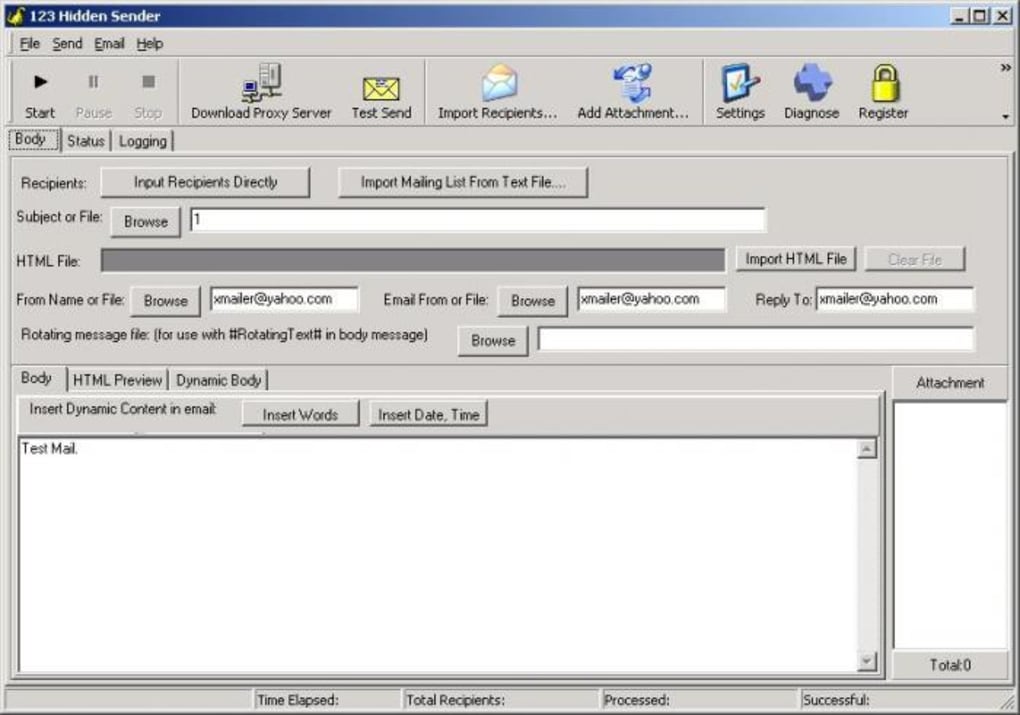
The user interface is intentionally minimalist: large buttons, clear labels, and a single‑pane layout keep the learning curve low. Because the software does not rely on cloud services, all operations happen locally, which enhances both speed and privacy. If you encounter any compatibility warnings on newer Windows versions, you can run the program in compatibility mode for Windows 98/ME, a feature built into modern Windows operating systems.
Compatibility, Pros & Cons
123 Hidden Sender is officially supported on Windows 98, Windows ME, and other legacy Windows releases that pre‑date Windows XP. While it can be launched on newer versions of Windows by using the built‑in compatibility settings, the developer has not released updates for modern environments. This focus on older systems makes the software especially valuable for organizations still operating on legacy hardware or for users in regions where older PCs remain common.
Pros
- Extremely low system requirements – runs smoothly on computers with as little as 128 MB RAM.
- True anonymity by stripping sender headers.
- Simple, no‑frills interface that requires minimal training.
- Free trial version lets you evaluate core features before purchasing.
- Built‑in throttling protects against ISP rate limits.
- Works offline; only the SMTP server is needed for sending.
Cons
- Lacks modern features such as built‑in analytics or bounce handling.
- No native support for Windows 10/11; requires compatibility mode on newer OS.
- English‑only UI may limit non‑English speaking users.
- No integrated contact management beyond simple CSV import.
- Last updated in 2008, so security patches are not provided.
Frequently Asked Questions
Is 123 Hidden Sender truly free?
The program offers a free trial that includes all core functionalities. To unlock unlimited sending and remove the trial banner, you need to purchase a license, which is a one‑time fee.
Can I use 123 Hidden Sender on Windows 10?
Yes, but you must run the executable in compatibility mode for Windows 98/ME. The program was not designed for modern Windows, so some visual elements may appear outdated.
How does the software ensure anonymity?
Before each email is sent, 123 Hidden Sender strips all standard header fields that could reveal the sender’s IP address or domain. It then replaces them with a generic “no‑reply” address that you define in the settings.
What SMTP servers are compatible?
Any standard SMTP server that supports plain authentication can be used, including popular services like Gmail (with App Passwords), Outlook, and dedicated bulk‑mail providers. You simply enter the server address, port, and credentials in the setup screen.
Is there a limit on the number of emails I can send per day?
The software itself does not impose a daily limit; however, your SMTP provider and ISP may enforce caps. Use the built‑in throttling feature to stay within those external limits.
Conclusion & Call to Action
123 Hidden Sender fills a specific gap in the bulk‑email market: a fast, lightweight, and truly anonymous mailing tool that runs on legacy Windows machines. While it does not compete with modern SaaS platforms in terms of analytics or advanced list management, its simplicity, low resource footprint, and focus on privacy make it a practical choice for users who need to send large volumes of email without revealing their identity. If you operate in an environment where older hardware is still in use, or if you simply prefer a no‑frills desktop solution, downloading the trial version is a risk‑free way to assess whether the software meets your needs.
Ready to experience secure, anonymous bulk mailing? Download 123 Hidden Sender now and start sending with confidence. For businesses that require unlimited sending and priority support, consider purchasing a full licence directly from the developer.







